
Article Summary: The first hour of a cyberattack decides how much of it you get back. Isolate the affected device from the network rather than powering it off, call your IT provider by phone instead of email, and if money moved, call the bank before you do anything else. Ransomware and wire fraud need different first hours, and conflating them costs people money. Texas gives you 60 days to notify affected individuals and 30 days to notify the Attorney General once 250 Texas residents are involved, and both clocks start the day you determine the breach occurred, not the day you finish cleaning up.
If this is happening right now
Four things, in this order. Read the rest later.
- Unplug the affected device from the network. Do not power it off.
- Call your IT provider by phone, not email. Ours is 346 410 0961.
- If money left an account, call the bank now and ask for a recall.
- Delete nothing. Not the ransom note, not the email, not the alert.
Everything below is the detail behind those four lines, plus the reporting deadlines that start running today whether anyone is watching the calendar or not.
Five things not to do
- Don’t power the machine off. Shutting down wipes what is in memory, and that is often where the answer to “how did they get in” lives. Pull the network cable instead. Power it down only if you genuinely cannot get it off the network any other way.
- Don’t delete the evidence. The ransom note, the phishing email, the alert that fired at 2am. All of it is what your insurer’s forensics team will ask for, and they will ask.
- Don’t discuss the incident from the compromised mailbox. If someone is reading that inbox, you are briefing them on your response. Move to phone calls or a different account entirely.
- Don’t pay anything in the first hour. Nobody has enough information yet.
- Don’t let one person handle it alone and unlogged. Write down what was done and when, from the beginning. Memory gets unreliable fast under pressure, and you will be asked to reconstruct a timeline.
Minute 0 to 5: contain it
Pull the network cable. Turn off Wi-Fi. Do it to anything that looks affected, and to anything that shares credentials with it.
The goal is to stop lateral movement and, more urgently, to keep whatever is happening away from your backups. Encrypting the backups is the actual objective of a competent ransomware operator, and they usually go looking for them before they trigger anything visible.
CISA’s guidance is to isolate rather than power down wherever you can, for the memory-evidence reason above.
One caveat for industrial environments. Isolating a device on an operational network is not the same as unplugging a laptop, and yanking the wrong cable at a facility can create a safety problem rather than solve a security one. If that is your situation, containment is a phone call to someone who knows the environment, not an improvisation.
Minute 5 to 15: get the right people on the phone
Your IT provider first, by phone.
What we need in the first two minutes of that call: which device, what you saw on screen, what was clicked and roughly when, whether money moved, and who else received the same thing. That is usually enough to tell us whether we are dealing with an encryption event, a mailbox compromise, or a false alarm, and those three go in completely different directions.
Your cyber insurer second. Read this bit even if nothing is on fire today: most policies require you to use their incident response panel, and bringing in your own forensics vendor first can reduce or void the claim. The number is on the policy. Put it somewhere you can find without email.
Inside the company, tell the smallest number of people who need to act. Not the whole staff, not yet. A company-wide message at this stage produces forty people forwarding screenshots and one of them telling a client.
We would genuinely rather take a false alarm at 2am than a real one at 8am. If you are unsure whether it is real, that is a reason to call, not a reason to wait until it is obvious.
Minute 15 to 30: the two different emergencies
This is where most published advice goes wrong. Ransomware and business email compromise get blended into one checklist, and they should not be. The first hour looks different for each.
If money moved: business email compromise and wire fraud
The device barely matters here. The clock is the bank’s.
Call the bank’s fraud line and ask for a recall, explicitly requesting a SWIFT recall or a Financial Fraud Kill Chain request if the amount is large and recent. Ask them to freeze the receiving account. Then report to the FBI’s Internet Crime Complaint Center. Do it immediately: the FBI’s Recovery Asset Team works with banks to freeze fraudulent transfers, and the sooner a transfer is reported, the better the chance the money can still be frozen. Recovery isn’t guaranteed.
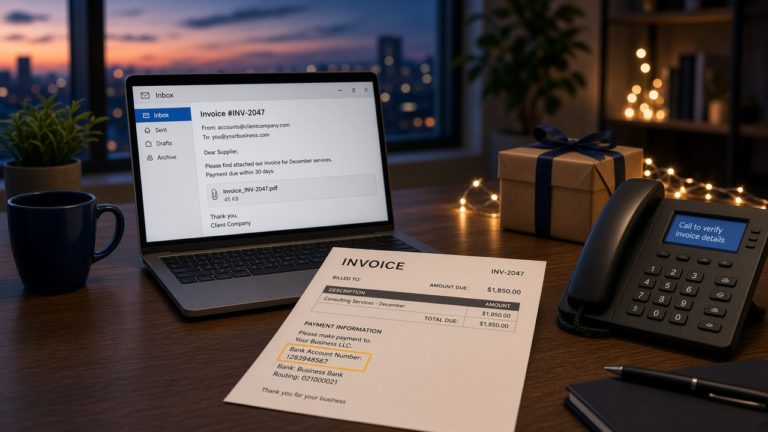
Around Houston this shows up most often at closings. A title company inbox gets read for a few weeks, the attacker waits for a real transaction, and then sends revised wire instructions that are correct in every detail except the account number. The buyer sends the money. Nobody notices for days.
If files are encrypted: ransomware
Protect the backups first, before anything else. Disconnect them, and if they are immutable or offline, leave them that way. Do not test a restore onto the production network yet.
Then reset credentials from a device you know is clean, and revoke sessions and refresh tokens rather than just changing passwords. A password change alone does not evict someone holding a valid token, which is a detail people miss and then wonder why the intruder is still there an hour later.
Before anyone says the word “pay,” check whether a free decryptor already exists for that strain. Sometimes one does.
Minute 30 to 60: preserve evidence and start the reporting clock
Do not reimage anything yet, however tempting it is to get a machine back into service. Forensics needs the disk as it is, and your insurer may require that analysis before they will pay.
Screenshots are useful. Originals are required. Keep both.
And start the notification analysis now rather than after remediation, because the deadlines below run from the day you determine a breach occurred, not the day you finish dealing with it. Companies routinely lose three weeks to cleanup and then discover the clock has been running the whole time.
Who you have to notify in Texas
None of this is legal advice, and you should have counsel involved in hour one rather than hour fifty. But you should know roughly what is coming, because the deadlines are shorter than most owners assume.
Federal
File with the FBI’s Internet Crime Complaint Center. If funds moved, do it immediately, alongside the call to your bank, for the reason above. Report to CISA as well, and if you want a human locally, the FBI Houston Field Office takes cyber reports directly.
Texas
Texas Business and Commerce Code section 521.053 sets two separate clocks, and both start on the date you determine the breach occurred.
- Affected individuals must be notified without unreasonable delay, and in every case no later than the 60th day after that date.
- If the breach involves at least 250 Texas residents, you must notify the Texas Attorney General no later than the 30th day after that date, using the electronic form on the Attorney General’s website. Note that this is the shorter of the two deadlines, which catches people out.
The Attorney General submission asks for a description of what happened, how many Texas residents were affected, how many you have already notified directly, what you have done about it, what you intend to do next, and whether law enforcement is investigating. That is a lot to assemble in 30 days if nobody started until the systems were back up. Texas also publishes breach listings, so the filing is not private.
If you are in a regulated industry
Additional duties stack on top of the state ones. Healthcare practices answer to HHS OCR under HIPAA. Financial firms and accounting firms have FTC Safeguards Rule notification obligations. Law firms have professional-responsibility duties to clients whose matters were exposed, which frequently arrive sooner than any statute.
Should you pay the ransom?
The FBI does not recommend it, and neither do we, but the honest answer is more complicated than a policy line.
Paying does not guarantee you get the files back. Decryptors supplied by criminals are frequently slow, buggy, or partial. It marks the business as one that pays, which has consequences later. And the money funds the next round.
What matters more is who makes the call. This is a decision for counsel, your insurer, the incident response team, and law enforcement together. It is not a decision for an exhausted owner alone at 11pm with a countdown timer on a screen, which is precisely the situation the countdown timer is designed to create.
If your backups are current and tested, the question usually answers itself. That is the entire argument for testing restores.
The one page to write before any of this happens
Everything above is easier if some of it was decided in advance. Not a binder. One page, printed, kept off the network, one copy at the office and one at home.
What goes on it:
- Your IT provider’s 24/7 number.
- Your cyber insurance policy number and the insurer’s incident hotline.
- Your bank’s fraud line, and the name of someone there if you have one.
- Counsel’s mobile number.
- The two people authorised to approve containment, meaning the people who can say “take it offline” without checking with anyone.
- Where the backups live, and the date of the last tested restore. Not the last successful backup. The last tested restore.
- The five systems that matter most, ranked, so nobody has to decide under pressure what gets recovered first.
Printed matters. During hurricane season this stops being theoretical: an evacuation scatters your staff, degrades your normal escalation path, and pushes everyone onto personal devices and home networks at exactly the moment phishing volume goes up. A paper call list is unglamorous and it works when nothing else does.
The rest is infrastructure, and it is the part we handle for clients: tested backups, monitoring, and the identity controls that make hour one survivable rather than terminal.
Frequently Asked Questions
What is the very first thing to do in a cyberattack?
Get the affected device off the network. Unplug the cable, turn off Wi-Fi, and leave it running. Then call your IT provider by phone rather than email, in case the mailbox is the thing that is compromised.
Should I shut the computer down if I see ransomware?
No, if you can avoid it. Powering down destroys what is in memory, which is often how investigators establish the entry point and whether data actually left the building. Isolate it instead. Shut it down only if there is no way to get it off the network.
We wired money to a scammer this morning. Can we get it back?
Possibly, and the odds depend almost entirely on speed. Call the bank’s fraud line immediately and ask for a recall and a freeze on the receiving account, then file with the FBI’s IC3. Reporting quickly improves the chance the funds can be frozen before they are moved on, but recovery isn’t guaranteed.
Who do we have to report a data breach to in Texas?
Affected individuals within 60 days of determining the breach occurred, and the Texas Attorney General within 30 days if at least 250 Texas residents are involved, through the electronic form on the Attorney General’s website. Regulated industries have additional obligations on top. Involve counsel early, because both clocks start earlier than people expect.
Do we have to tell our customers?
If their sensitive personal information was exposed, yes, and the 60-day deadline applies. Beyond the legal requirement, customers generally find out eventually, and finding out from you is a materially better outcome than finding out from someone else.
Final Thought
Nobody performs well at this while reading about it for the first time. The businesses that come through an incident intact are not the ones with the best technology, they are the ones where somebody already knew who to call and where the backups were.
That page takes twenty minutes to write. If you would rather we helped you build it, or you want an honest assessment of whether your backups would actually restore, get in touch. Worth reading next: passkeys and phishing-resistant sign-in, which stops a good share of these before they start, and internal versus outsourced IT if you are wondering who is actually on call at 2am.