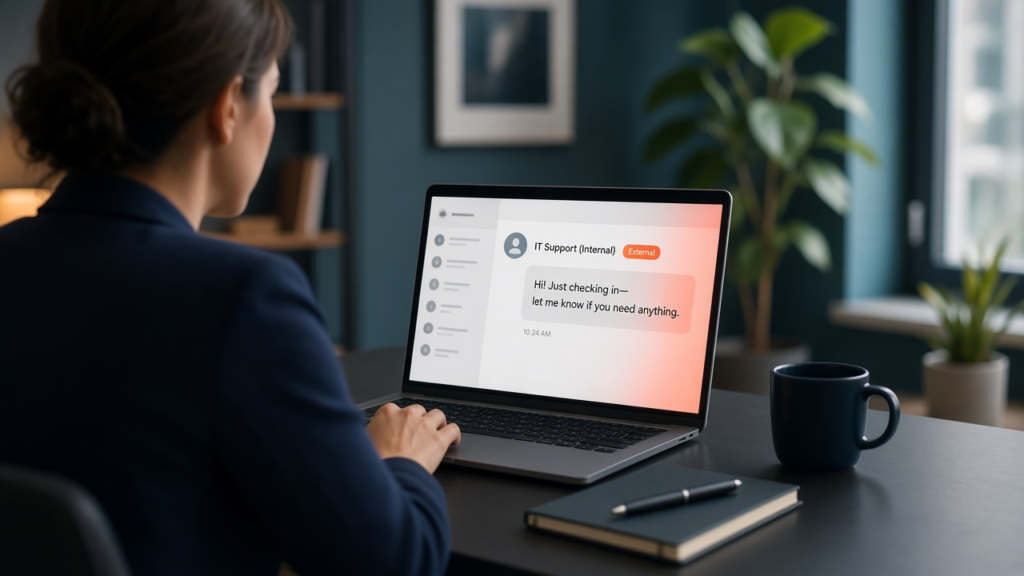
It usually starts with a flood. An employee’s inbox suddenly fills with hundreds of newsletter sign-ups and subscription confirmations. A few minutes later, a friendly message pops up in Microsoft Teams from “IT Support (Internal)”: We’ve noticed a spam problem on your account. Can we hop on a quick call and fix it?
It feels helpful. It’s well timed. And it’s the opening move in one of the most common ways attackers are getting into businesses right now.
How the fake IT help desk scam works
Last week, security firm Arctic Wolf published research on more than 400 incidents in which attackers used Microsoft Teams to pose as a company’s own IT help desk. The pattern is consistent: bury someone’s inbox in spam, then show up on Teams offering to fix it. Once the employee agrees to a call, the “technician” asks them to open a remote-access tool, often Quick Assist, which is built into Windows and only requires reading back a six-digit code.
From there, the attacker has the same view of the computer that a real support technician would. In the cases researchers documented, that access was used to steal passwords, install a second remote-access tool as a backup way in, move deeper into the network, take data, and in some cases launch ransomware. Microsoft’s own incident responders have described the same playbook: in one case, the attacker called two employees who said no, then tried a third who said yes.
What makes this worth your attention is that nothing here is “hacking” in the traditional sense. No software flaw is involved. Teams allows people from other organizations to message and call your staff by default, and attackers simply set up their own Microsoft accounts with names like helpdesk or IT Service Desk to look official. Teams does label these messages as “External,” but a busy person who is already annoyed about a spam flood is not studying labels.
Why smaller businesses are especially exposed
In a large company, employees might never expect a personal message from IT. In a 20- or 50-person business, they very well might. Many small businesses work with an outside IT provider, so a message from “support” that doesn’t come from a familiar coworker doesn’t seem strange at all. That trust is exactly what attackers are counting on.
There’s also a cost angle. According to Coveware’s latest quarterly data, the median ransom paid rose to $400,000 last quarter, and data was stolen in most cases. That’s an existential number for many small businesses, and it starts with a single helpful-sounding chat.
What to do this week
You don’t need a big project to close this door. Here’s where we’d start:
1. Decide who outside your company can reach your staff on Teams. Most businesses don’t need every Microsoft 365 user in the world to be able to message their employees. Your IT provider can limit outside chats to the specific partners, vendors, and clients you actually work with. This one change stops most of these attempts before they reach anyone.
2. Tell your team how real IT support contacts them. Write it down in one sentence and share it: for example, “Our IT team will never message you out of the blue on Teams and ask you to install anything or read us a code.” When employees know what normal looks like, an impostor stands out.
3. Create a simple “hang up and call back” rule. If anyone claiming to be IT asks for remote access, a password, or an MFA reset, the employee ends the conversation and calls the support number they already have on file. Real support will never mind.
4. Control which remote-access tools are allowed. If your business uses one remote support tool, it should be the only one that works on company computers. Blocking or limiting Quick Assist, AnyDesk, and similar tools you don’t use takes away the attacker’s easiest way in.
5. Treat a sudden spam flood as a warning sign, not just an annoyance. If someone’s inbox suddenly fills with sign-up emails, that’s the moment to expect a fake “IT” contact. Make sure staff know to report it to your real IT team rather than wait for someone to reach out.
If someone already said yes
If an employee granted remote access to someone they now aren’t sure about, disconnect that computer from the network, don’t turn it off, and contact your IT provider right away. Speed matters here. Our guide on what to do in the first hour of a cyberattack walks through the next steps in plain language.
The bigger picture
This is part of a broader shift we’ve been writing about: attackers increasingly don’t break in, they get let in. Last month it was third-party apps quietly granted access to Microsoft 365. This month it’s a fake help desk on Teams. The common thread is that the tools your business relies on every day have settings that favor convenience by default, and a short review of those settings removes a lot of risk.
If you’re not sure how your Teams external access is set up, or whether your staff would recognize a fake IT message, that’s a good conversation to have with your IT partner this week. At Altivus, we help businesses across the country review exactly these kinds of settings, and we’re happy to walk through yours.