
Article Summary: AI email phishing now targets both people and inbox assistants like Copilot. Here’s how the dual-target trick works, and what business owners should do before trusting an urgent summary.
A lot of businesses have started leaning on AI tools to keep up with email. Microsoft Copilot and similar assistants can summarize a long thread, flag what looks urgent, and suggest next steps. That’s real time saved.
But there’s a catch most people haven’t thought about yet. If your team trusts the AI’s summary more than the email itself, then whoever can influence that summary has a new way to influence your team. Attackers have noticed — and AI email phishing is one of the clearest examples of AI-powered cyberattacks.
What the research found about AI email phishing
In October 2026, Barracuda Research described phishing emails built to fool two audiences at once: the person reading the email and the AI assistant reading it on their behalf. You could call it a “dual-target” attack, and it works on two layers.
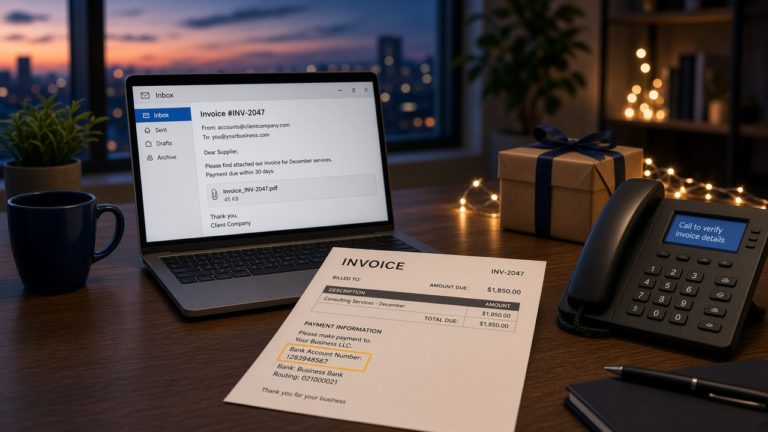
The first layer is aimed at people. It looks like a normal business email — an invoice, a document to review, a vendor update. Often it includes a password-protected attachment, with the password conveniently provided in the message. Locking the file can make it harder for email security tools to look inside, and opening it can lead to stolen passwords or malicious software.
The second layer is aimed at the AI. Hidden inside the email are instructions written for the assistant, not the human. These instructions are invisible to the person reading — tucked into the email’s code, set in text that doesn’t display, or disguised in other ways. The industry term for this is “prompt injection,” which simply means sneaking commands into content that an AI will read and potentially follow.
Think of it like a note slipped to your assistant that you never see. You asked them to summarize the morning’s mail; the note tells them to put a particular message at the top and call it urgent.
What AI email phishing looks like in practice
The scenarios Barracuda described are the kind that should get the attention of anyone who handles money or vendor relationships.
In one example, an invoice email carried hidden instructions telling the AI summary to add a priority action item: update a vendor’s payment details. The employee never sees anything strange in the email itself. They see a helpful summary from a tool they trust, telling them a vendor’s bank information has changed and needs attention. That’s a short step from a wire transfer to the wrong account — and if money does leave, what you do in the first hour decides how much of it you get back.
The research also noted that hidden instructions can tell an assistant to treat a phishing email as legitimate or urgent — so even if an employee was going to skip it, the AI nudges them back toward opening it and clicking the link. Other hidden instructions may try to get an assistant to share information it shouldn’t.
None of this requires the attacker to break into your systems. They just send an email and let your own tools do some of the persuading.
Why this matters for small and mid-sized businesses
Payment fraud and fake vendor changes were costly problems long before AI. What’s different now is where the trust sits. Staff have been trained — rightly — to look for odd sender addresses, spelling errors, and pressure tactics. But if they’re reading a clean, confident AI summary instead of the original email, many of those warning signs never reach them.
The tools aren’t the problem by themselves. The risk comes from treating an AI summary as a verified fact rather than what it is: a quick read of content that may have been written by someone with bad intentions.
What to do about AI email phishing now
You don’t need to turn off your AI tools. You do need to put the right guardrails around them. A few practical steps:
1. Never change payment details based on an email — or an email summary. Any request to update bank information, redirect a payment, or add a new vendor account should be confirmed by phone using a number you already have on file, not one provided in the message. This one habit stops many payment fraud attempts, AI or not.
2. Require a second person for payments and vendor changes. A simple two-person approval for wire transfers and changes to vendor records adds a pause that scammers depend on you skipping.
3. Teach staff that the summary is not the source. If an AI summary flags something urgent — especially involving money, passwords, or attachments — open the original email and look at it directly before acting. Urgency is still the oldest trick there is.
4. Be cautious with password-protected attachments. A locked file with the password in the same email deserves extra scrutiny, particularly from an unexpected sender. When in doubt, check with the sender through a separate channel.
5. Review what your AI assistant is allowed to do. Some assistants can only summarize; others can draft replies, accept calendar invites, or take other actions. The more an assistant can do on its own, the more an attacker gains by manipulating it. Limit automatic actions where they aren’t truly needed.
6. Make sure your email security is current. Modern email filtering is increasingly designed to spot hidden content and suspicious instructions inside messages. If your protection hasn’t been reviewed since you turned on AI features, it’s worth a look.
The bottom line
AI email assistants are useful, and they’re not going away. But attackers adapt to whatever people trust, and right now people are starting to trust their AI summaries. The businesses that stay safe won’t be the ones that avoid new tools — they’ll be the ones that keep a human check on the decisions that matter, especially anything involving money.
If you’re not sure how your AI tools are configured or whether your payment approval process would hold up against a convincing fake request, that’s a good conversation to have with your IT provider. At Altivus, it’s one we’re having with clients more often — because the fix is usually more about process than technology.